Sidebar
Native sidebar composition, package imports, and editable Swift source.
Preview
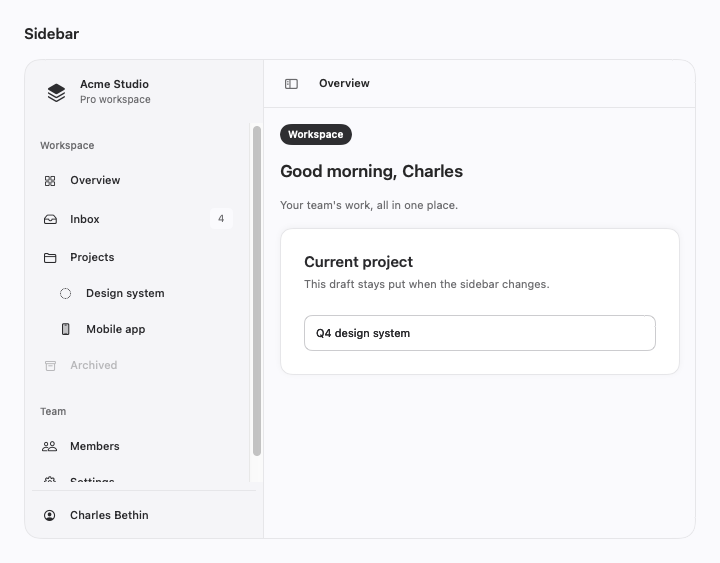
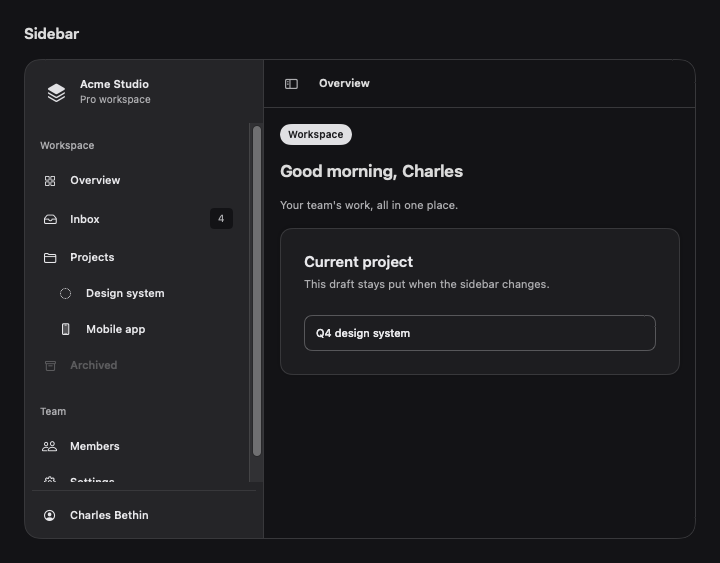
Use it
Import SwiftCN to use CNSidebar directly. This complete example also runs in the native component gallery.
import SwiftUI
import SwiftCN

struct SidebarExample: View {
    @Environment(\.twTheme) private var theme
    @State private var selection = "Overview"
    @State private var visibility: NavigationSplitViewVisibility = .all
    @State private var mobilePresented = false
    @State private var draft = "Q4 design system"

    init(initialMobilePresented: Bool = false) {
        _mobilePresented = State(initialValue: initialMobilePresented)
    }

    var body: some View {
        CNSidebar(visibility: $visibility, mobilePresented: $mobilePresented) {
            SidebarNavigationExample(selection: $selection)
        } detail: {
            VStack(alignment: .leading, spacing: 0) {
                HStack(spacing: 8) {
                    CNSidebarTrigger().keyboardShortcut("b", modifiers: .command)
                    Text(selection).tw("text-sm font-semibold")
                    Spacer()
                }.tw("p-2")
                CNSeparator()
                ScrollView {
                    VStack(alignment: .leading, spacing: 16) {
                        CNBadge("Workspace")
                        Text(selection == "Overview" ? "Good morning, Charles" : selection)
                            .tw("text-xl font-semibold")
                        Text("Your team's work, all in one place.").tw("text-sm text-mutedForeground")
                        CNCard {
                            CNCardHeader {
                                CNCardTitle("Current project")
                                CNCardDescription("This draft stays put when the sidebar changes.")
                            }
                            CNCardContent { CNInput("Project name", text: $draft) }
                        }
                    }.tw("p-4 w-full")
                }
            }.tw("bg-background")
        }.tw("h-[480] border rounded-xl")
            .clipShape(RoundedRectangle(cornerRadius: theme.radius(.xl)))
    }
}

private struct SidebarNavigationExample: View {
    @Binding var selection: String
    @Environment(\.cnSidebarContext) private var sidebar
    @Environment(\.dynamicTypeSize) private var typeSize
    var body: some View {
        CNSidebarHeader {
            HStack(spacing: 8) {
                if !typeSize.isAccessibilitySize || sidebar.isCollapsed {
                    Image(systemName: "square.stack.3d.up.fill").tw("w-8 h-8 text-xl text-primary")
                }
                if !sidebar.isCollapsed {
                    VStack(alignment: .leading, spacing: 2) {
                        Text("Acme Studio").lineLimit(1).tw("text-sm font-semibold")
                        if !typeSize.isAccessibilitySize {
                            Text("Pro workspace").lineLimit(1).tw("text-xs text-mutedForeground")
                        }
                    }.transition(.opacity)
                    Spacer()
                    if sidebar.isCompact { CNSidebarTrigger() }
                }
            }.tw("p-2")
        }
        CNSidebarContent {
            CNSidebarGroup {
                CNSidebarGroupLabel("Workspace")
                CNSidebarMenu {
                    item("Overview", icon: "square.grid.2x2")
                    item("Inbox", icon: "tray", badge: "4")
                    item("Projects", icon: "folder")
                    CNSidebarMenuSub {
                        item("Design system", icon: "circle.dotted")
                        item("Mobile app", icon: "iphone")
                    }
                    CNSidebarMenuButton("Archived", systemImage: "archivebox", action: {}).disabled(true)
                }
            }
            CNSidebarGroup {
                CNSidebarGroupLabel("Team")
                CNSidebarMenu {
                    item("Members", icon: "person.2")
                    item("Settings", icon: "gearshape")
                }
            }
        }
        CNSidebarFooter {
            CNSeparator()
            CNSidebarMenuButton("Charles Bethin", systemImage: "person.crop.circle", dismissOnSelect: false,
                                action: { selection = "Account" })
        }
    }
    private func item(_ title: String, icon: String, badge: String? = nil) -> some View {
        CNSidebarMenuButton(title, systemImage: icon, isSelected: selection == title, badge: badge,
                           action: { selection = title })
    }
}
Native behavior
A custom SwiftUI sidebar composes pinned headers and footers, scrollable groups, selected menu buttons, badges, and nested menus. Desktop visibility supports icon rails, offcanvas collapse, or a fixed panel. Compact widths use a separate controlled or local drawer state; outside activation, menu selection, Escape, and a horizontal swipe dismiss it. Native buttons retain focus, disabled state, roles, and accessibility. The detail and sidebar remain mounted through reversible transitions. Set sidebar-motion to animate-none in global rules to disable motion; presets also respect Reduce Motion. The host owns navigation destinations and selection. Swipe dismissal uses a background surface along the outer 24-point edge. Native controls in front keep their gestures.
Compose with native SwiftUI
See complete native composition examples for direct native controls, caller-owned sheets, navigation, and desktop split views. The examples use the same editable recipes.
Style and compose
Visual recipes use .tw classes. Append classes: to override a recipe locally, or change the recipe in TWGlobalRules.named for your subtree. Native layout and interaction modifiers remain SwiftUI APIs. For control colors, append cn-tint-[primary], another theme token, or an interpolated Color.
Motion recipes are editable too: control-motion uses a 150 ms smooth response, disclosure-motion uses a 250 ms spring, and feedback-motion uses a 200 ms smooth response. Set a recipe to animate-none in your global rules to turn it off. Presets respect Reduce Motion. Static components stay still; native scrolling, drag tracking, and platform presentation keep their own gestures.
Action groups and card, dialog, and questionnaire footers stack when their content does not fit. The native layout preserves the same child controls during this change.
View builders preserve native child content. Native Button roles, labels, keyboard shortcuts, submit actions, and presentation modifiers still work. A string recipe does not replace a native control API or a typed chart mark.
Own the source
Copy the complete file below into your app alongside import SwiftCN. The file contains related composable parts from the same family. Its dependencies use public package APIs, so copied and imported components can coexist.
To own the styling engine too, download the complete source bundle. It contains every component, the .tw engine, its recipes, and the MIT license. Keep those files in one module and remove import SwiftCN from the usage example.
import SwiftUI
import SwiftCN

public enum CNSidebarCollapsible: Sendable { case icon, offcanvas, none }
public enum CNSidebarSide: Sendable { case leading, trailing }

/// Persistent desktop navigation and a compact drawer share one mounted sidebar.
/// Desktop visibility and compact presentation have independent bindings.
public struct CNSidebar<Sidebar: View, Detail: View>: View {
    @Binding private var visibility: NavigationSplitViewVisibility
    private let mobilePresented: Binding<Bool>?
    @State private var localMobilePresented = false
    @GestureState private var dragOffset: CGFloat = 0
    @FocusState private var drawerFocused: Bool
    @Environment(\.layoutDirection) private var direction
    @Environment(\.dynamicTypeSize) private var typeSize
    private let collapsible: CNSidebarCollapsible
    private let side: CNSidebarSide
    private let width: CGFloat
    private let collapsedWidth: CGFloat
    private let compactBreakpoint: CGFloat
    private let classes: TWClasses
    private let sidebar: Sidebar
    private let detail: Detail
    public init(visibility: Binding<NavigationSplitViewVisibility>, mobilePresented: Binding<Bool>? = nil,
                collapsible: CNSidebarCollapsible = .icon, side: CNSidebarSide = .leading,
                width: CGFloat = 240, collapsedWidth: CGFloat = 64, compactBreakpoint: CGFloat = 640,
                classes: TWClasses = "", @ViewBuilder sidebar: () -> Sidebar, @ViewBuilder detail: () -> Detail) {
        precondition(width.isFinite && width > 0 && collapsedWidth.isFinite && collapsedWidth > 0 && collapsedWidth <= width)
        precondition(compactBreakpoint.isFinite && compactBreakpoint > width)
        _visibility = visibility; self.mobilePresented = mobilePresented; self.collapsible = collapsible
        self.side = side; self.width = width; self.collapsedWidth = collapsedWidth
        self.compactBreakpoint = compactBreakpoint; self.classes = classes
        self.sidebar = sidebar(); self.detail = detail()
    }
    private var mobile: Binding<Bool> { mobilePresented ?? $localMobilePresented }
    private var desktopOpen: Bool { collapsible == .none || visibility != .detailOnly }
    private var hiddenSign: CGFloat {
        (side == .leading) == (direction == .leftToRight) ? -1 : 1
    }
    public var body: some View {
        GeometryReader { geometry in
            let compact = geometry.size.width < compactBreakpoint
            let compactWidth = max(0, geometry.size.width - 44)
            let panelWidth = compact ? (typeSize.isAccessibilitySize ? compactWidth : min(width, compactWidth)) : width
            let railWidth = desktopOpen ? panelWidth : (collapsible == .icon ? collapsedWidth : 0)
            let visibleWidth = compact ? 0 : railWidth
            let context = CNSidebarContext(isCollapsed: !compact && !desktopOpen && collapsible == .icon,
                isCompact: compact, isPresented: compact ? mobile.wrappedValue : desktopOpen,
                canToggle: compact || collapsible != .none,
                toggle: { if compact { mobile.wrappedValue.toggle() }
                          else if collapsible != .none { visibility = visibility == .detailOnly ? .all : .detailOnly } },
                dismiss: { mobile.wrappedValue = false })
            ZStack(alignment: side == .leading ? .leading : .trailing) {
                HStack(spacing: 0) {
                    if side == .leading { Color.clear.frame(width: visibleWidth) }
                    detail.frame(maxWidth: .infinity, maxHeight: .infinity)
                        .disabled(compact && mobile.wrappedValue)
                        .allowsHitTesting(!compact || !mobile.wrappedValue)
                        .accessibilityHidden(compact && mobile.wrappedValue)
                    if side == .trailing { Color.clear.frame(width: visibleWidth) }
                }
                // A mounted scrim and pane allow every reversal to retarget immediately.
                Button(action: context.dismiss) { Color.clear.tw("sidebar-scrim") }
                    .buttonStyle(.plain).opacity(compact && mobile.wrappedValue ? 1 : 0)
                    .allowsHitTesting(compact && mobile.wrappedValue)
                    .accessibilityHidden(!compact || !mobile.wrappedValue)
                    .accessibilityLabel("Close sidebar")
                VStack(spacing: 0) { sidebar }
                    .frame(width: context.isCollapsed ? collapsedWidth : panelWidth, height: geometry.size.height,
                           alignment: .topLeading)
                    .background(alignment: hiddenSign < 0 ? .leading : .trailing) {
                        if compact && mobile.wrappedValue {
                            // Keep the recognizer off child controls. Native controls in front of
                            // this edge surface retain their hit testing and drag handling.
                            Color.clear.frame(width: 24).contentShape(Rectangle())
                                .gesture(DragGesture(minimumDistance: 20)
                                    .updating($dragOffset) { value, offset, transaction in
                                        guard abs(value.translation.width) > abs(value.translation.height) * 1.5 else { return }
                                        transaction.disablesAnimations = true
                                        offset = hiddenSign * min(panelWidth, max(0, hiddenSign * value.translation.width))
                                    }.onEnded { value in
                                        guard abs(value.translation.width) > abs(value.translation.height) * 1.5 else { return }
                                        if hiddenSign * value.predictedEndTranslation.width > panelWidth * 0.35 { context.dismiss() }
                                    })
                                .accessibilityHidden(true)
                        }
                    }
                    .tw(cn("sidebar", classes))
                    .overlay(alignment: side == .leading ? .trailing : .leading) {
                        CNSeparator(axis: .vertical)
                    }
                    .offset(x: !compact && collapsible == .offcanvas ? hiddenSign * (panelWidth - visibleWidth) : 0)
                    .frame(width: compact ? panelWidth : visibleWidth, alignment: side == .leading ? .leading : .trailing)
                    .clipped()
                    .offset(x: compact ? (mobile.wrappedValue ? dragOffset : hiddenSign * panelWidth) : 0)
                    .allowsHitTesting(compact ? mobile.wrappedValue : visibleWidth > 0)
                    .accessibilityHidden(compact ? !mobile.wrappedValue : visibleWidth == 0)
                    .accessibilityElement(children: .contain)
                    .accessibilityAddTraits(compact && mobile.wrappedValue ? .isModal : [])
                    .focusable(compact && mobile.wrappedValue)
                    .focusEffectDisabled()
                    .focused($drawerFocused)
            }.environment(\.cnSidebarContext, context)
                .twAnimation("sidebar-motion", value: desktopOpen, tracksHover: false)
                .twAnimation("sidebar-motion", value: mobile.wrappedValue, tracksHover: false)
                .twAnimation("sidebar-motion", value: dragOffset, tracksHover: false)
                .onChange(of: compact) { _, _ in mobile.wrappedValue = false; drawerFocused = false }
                .onChange(of: mobile.wrappedValue) { _, presented in drawerFocused = compact && presented }
                .onAppear { drawerFocused = compact && mobile.wrappedValue }
                .onKeyPress(.escape) {
                    guard compact, mobile.wrappedValue else { return .ignored }
                    context.dismiss(); return .handled
                }
        }
    }
}

public struct CNSidebarTrigger: View {
    @Environment(\.cnSidebarContext) private var context
    private let classes: TWClasses
    public init(_ classes: TWClasses = "") { self.classes = classes }
    public var body: some View {
        CNButton(variant: .ghost, size: .icon, classes: cn("sidebar-trigger", classes), action: context.toggle) {
            Image(systemName: "sidebar.leading")
        }.accessibilityLabel(context.isCompact ? (context.isPresented ? "Close sidebar" : "Open sidebar") :
                             (context.isCollapsed || !context.isPresented ? "Expand sidebar" : "Collapse sidebar"))
            .accessibilityValue(context.isPresented ? "Expanded" : "Collapsed")
            .disabled(!context.canToggle)
    }
}
public struct CNSidebarHeader<Content: View>: View {
    private let classes: TWClasses
    private let content: Content
    public init(_ classes: TWClasses = "", @ViewBuilder content: () -> Content) { self.classes = classes; self.content = content() }
    public var body: some View { VStack(alignment: .leading, spacing: 8) { content }.tw(cn("sidebar-header", classes)) }
}
public struct CNSidebarContent<Content: View>: View {
    private let classes: TWClasses
    private let content: Content
    public init(_ classes: TWClasses = "", @ViewBuilder content: () -> Content) { self.classes = classes; self.content = content() }
    public var body: some View {
        ScrollView { VStack(alignment: .leading, spacing: 16) { content }.tw(cn("sidebar-content", classes)) }
            .frame(maxHeight: .infinity)
    }
}
public struct CNSidebarFooter<Content: View>: View {
    private let classes: TWClasses
    private let content: Content
    public init(_ classes: TWClasses = "", @ViewBuilder content: () -> Content) { self.classes = classes; self.content = content() }
    public var body: some View { VStack(alignment: .leading, spacing: 8) { content }.tw(cn("sidebar-footer", classes)) }
}
public struct CNSidebarGroup<Content: View>: View {
    private let classes: TWClasses
    private let content: Content
    public init(_ classes: TWClasses = "", @ViewBuilder content: () -> Content) { self.classes = classes; self.content = content() }
    public var body: some View { VStack(alignment: .leading, spacing: 4) { content }.tw(cn("sidebar-group", classes)) }
}
public struct CNSidebarGroupLabel: View {
    @Environment(\.cnSidebarContext) private var context
    private let title: LocalizedStringKey
    private let classes: TWClasses
    public init(_ title: LocalizedStringKey, classes: TWClasses = "") { self.title = title; self.classes = classes }
    public var body: some View {
        Text(title).lineLimit(1).tw(cn("sidebar-group-label", classes))
            .frame(height: context.isCollapsed ? 0 : nil).opacity(context.isCollapsed ? 0 : 1)
            .accessibilityHidden(context.isCollapsed).accessibilityAddTraits(.isHeader).clipped()
    }
}
public struct CNSidebarMenu<Content: View>: View {
    private let classes: TWClasses
    private let content: Content
    public init(_ classes: TWClasses = "", @ViewBuilder content: () -> Content) { self.classes = classes; self.content = content() }
    public var body: some View { VStack(alignment: .leading, spacing: 4) { content }.tw(cn("sidebar-menu", classes)) }
}
public struct CNSidebarMenuButton: View {
    @Environment(\.cnSidebarContext) private var context
    @ScaledMetric(relativeTo: .body) private var iconWidth: CGFloat = 20
    private let title: String
    private let systemImage: String
    private let isSelected: Bool
    private let badge: String?
    private let dismissOnSelect: Bool
    private let classes: TWClasses
    private let action: () -> Void
    public init(_ title: String, systemImage: String, isSelected: Bool = false, badge: String? = nil,
                dismissOnSelect: Bool = true, classes: TWClasses = "", action: @escaping () -> Void) {
        self.title = title; self.systemImage = systemImage; self.isSelected = isSelected; self.badge = badge
        self.dismissOnSelect = dismissOnSelect; self.classes = classes; self.action = action
    }
    public var body: some View {
        CNButton(variant: .ghost, classes: cn("sidebar-menu-button", isSelected ? "sidebar-menu-selected" : "", classes), action: {
            action()
            if context.isCompact && dismissOnSelect { context.dismiss() }
        }) {
            HStack(spacing: 10) {
                Image(systemName: systemImage).frame(width: context.isCollapsed ? 20 : iconWidth).accessibilityHidden(true)
                if !context.isCollapsed {
                    Text(title).lineLimit(1).frame(maxWidth: .infinity, alignment: .leading).transition(.opacity)
                    if let badge { Text(badge).tw("sidebar-menu-badge").transition(.opacity) }
                }
            }.frame(maxWidth: .infinity, alignment: context.isCollapsed ? .center : .leading)
        }.accessibilityLabel(title).accessibilityValue(badge ?? "")
            .accessibilityAddTraits(isSelected ? .isSelected : []).help(title)
    }
}
/// Nested navigation remains mounted when the desktop rail collapses.
public struct CNSidebarMenuSub<Content: View>: View {
    @Environment(\.cnSidebarContext) private var context
    private let classes: TWClasses
    private let content: Content
    public init(_ classes: TWClasses = "", @ViewBuilder content: () -> Content) { self.classes = classes; self.content = content() }
    public var body: some View {
        VStack(alignment: .leading, spacing: 4) { content }.tw(cn("sidebar-menu-sub", classes))
            .frame(height: context.isCollapsed ? 0 : nil).opacity(context.isCollapsed ? 0 : 1).clipped()
            .allowsHitTesting(!context.isCollapsed).accessibilityHidden(context.isCollapsed)
    }
}